Hewlett Packard / HP unveiled new research indicating that the cost and frequency of cybercrime have both continued to rise for the third straight year.
According to the third annual study of U.S. companies, the occurrence of cyberattacks has more than doubled over a three-year period, while the financial impact has increased by nearly 40%.
Conducted by the Ponemon Institute and sponsored by HP, the 2012 Cost of Cyber Crime Study found that the average annualized cost of cybercrime incurred by a benchmark sample of U.S. organizations was $8.9 million. This represents a 6% increase over the average cost reported in 2011, and a 38% increase over 2010. The 2012 study also revealed a 42% increase in the number of cyberattacks, with organizations experiencing an average of 102 successful attacks per week, compared to 72 attacks per week in 2011 and 50 attacks per week in 2010.
“Organizations are spending increasing amounts of time, money and energy responding to cyberattacks at levels that will soon become unsustainable,” said Michael Callahan, vice president, Worldwide Product and Solution Marketing, Enterprise Security Products, HP. “There is clear evidence to show that the deployment of advanced security intelligence solutions helps to substantially reduce the cost, frequency and impact of these attacks.”
The most costly cybercrimes continue to be those caused by malicious code, denial of service, stolen or hijacked devices, and malevolent insiders. When combined, these account for more than 78% of annual cybercrime costs per organization. Additional key findings include:
· Information theft and business disruption continue to represent the highest external costs. On an annual basis, information theft accounts for 44% of total external costs, up 4% from 2011. Disruption to business or lost productivity accounted for 30% of external costs, up 1 percent from 2011.
· Deploying advanced security intelligence solutions can mitigate the impact of cyberattacks. Organizations that deployed security information and event management (SIEM) solutions realized a cost savings of nearly $1.6 million per year. As a result, these organizations experienced a substantially lower cost of recovery, detection and containment than organizations that had not deployed SIEM solutions.
· Cyberattacks can be costly if not resolved quickly. The average time to resolve a cyberattack is 24 days, but it can take up to 50 days according to this year’s study. The average cost incurred during this 24-day period was $591,780, representing a 42% increase over last year’s estimated average cost of $415,748 during an 18-day average resolution period.
· Recovery and detection remain the most costly internal activities associated with cybercrime. On an annual basis, these activities account for almost half of the total internal cost, with operating expenses and labor representing the majority of the total.
“The purpose of this benchmark research is to quantify the economic impact of cyberattacks and observe cost trends over time,” said Dr. Larry Ponemon, chairman and founder, Ponemon Institute. “We believe a better understanding of the cost of cybercrime will assist organizations in determining the appropriate amount of investment and resources needed to prevent or mitigate the devastating consequences of an attack.”
In conjunction with this third annual study of U.S. companies, cybercrime cost studies also were conducted in Australia, Germany, Japan and the United Kingdom. HP is hosting a series of webinars highlighting the findings from these studies, with the U.S.-focused webinar taking place Nov. 7.
HP is changing the enterprise security landscape with the HP Security Intelligence platform, which uniquely leverages advanced threat research and powerful correlation of security events and vulnerabilities to deliver security intelligence spanning IT operations, applications and infrastructure.
Source: HP Research: Cybercrime Costs Rise Nearly 40 Percent, Attack Frequency Doubles
Monday, October 15, 2012
Wednesday, October 10, 2012
An Apple a Day...

I have been anxiously awaiting the new generation Apple iPhone for six months (believe they'll call it version 5). Already found a buyer for my "4". Today I scoured Google for any new information that I have yet to devour. (elapsed time .. 55 minutes). Naturally there was a vast amount of knowledge to absorb. Spent 47 minutes reading articles and opinions. Some are even claiming that iPhone 5 will cure our Country's economic ills:
Higher Impact: QE3 or iPhone5
So, let me digest this. Somehow, if we all go out and buy a new phone (smart or not) all the economic pain will abruptly end.
Great the economic problem solved so let's get back to my "can't live without" new iPhone. I can just feel the sensation of that little gem in the palm of my hand. That slender firm larger body and slick brushed finish. An improved battery that will keep iphone 5 and me engaged for longer and more exciting times. What more can a man ask for?
Did I forget to mention my dream phone will now give me the intimate Facebook experience, I've always longed for while eating my lunch.
Wait ... there is something very wrong with the picture in my head. I asked myself, do I need an extra line of "Apps" on the screen? Do I need that slick body? Do I need a faster processor (iOS6) and longer battery, do I need "Do Not Disturb", since I learned simply to use the mute feature. Do I really need Passbook or do I need to find a "special hour" a day to spend with my wife. I don't have any little ones at home, unfortunately, wish we did.
I though seriously, how much better will my life be with #5. Soon I realized those new features would only make me a greater prisoner of the phone gadget.
I recalled my old Samsung (only phone .. no camera) devise. It called the people I need to talk to and then left me alone.
I had no Apps, no Music, no Email and no Twitter but I had TIME. I read more, I talked to my neighbors more, I walked more, I laughed more and I enjoyed my wife's company more. I was a happier "iPhoneless Person" .... can you image the wonderful events of life that may happen when you have that extra hour a day to spend it in a social way.
More than 5 million new iPhones and accompanying accessories will find their way into happy homes over the next few months. There will be many happy and engaged consumers exploring all the new bells and whistles the iPhone5 offers and with the new "Assistant" feature, you may just need one less friend.
Wow, did I just hear that the improved 5.5 version is in the final stages of development. Can't wait to read about it and just maybe consider my own upgrade. Yes, they have us hooked.
Looking on The Other Side
"Time is the most undefinable yet paradoxical of things; the past is gone, the future is not come, and the present becomes the past even while we attempt to define it, and, like the flash of lightning, at once exists and expires."
~Charles Caleb Colton
Monday, October 08, 2012
Wide Format Printing (at a glance)
According to SGIA's (Specialty Graphic Imaging Association) 2012 Market Trends and Product Specialties Benchmarking Report, digital imaging technology is the dominant technology for the graphics and sign community. Close to 70% of respondents indicated that they are exclusively digital or, are primarily digital printers.
Wide format technology has advanced in terms of quality, speed and applications because of increasing competition among OEMs (Original Equipment Manufacturers) for their share of the rapidly growing Display Graphics market. Banners, posters and signs remain the leading large format applications, with photography gaining an increasing share. Drawings, proofs, flags and textiles are showing declines, with other applications remaining relatively stable. Quality, price and speed are the three key drivers for selection of a signage and display graphics print provider. Customers are more familiar with digital technology due to the proliferation of vehicle wraps and outdoor banners and are demanding higher quality output.
The key to providing the highest quality output at a competitive price is to use ColorMatch ink that eliminates any need to re-profile the equipment. Labor is a major cost component and re-profiling will cost more than any nominal "savings" from inferior ink. Sign shops, fine art printers and major equipment distributors use ColorMatch ink because its performance is true to its name.
One hundred percent of Priceless Ink & Toner cartridges undergo Quality Assurance testing that virtually eliminates "read errors" upon cartridge installation. A technical service specialist recently reported that he has experienced a significant increase in "read errors" among a major OEM’s ink cartridges which is likely due to a decrease in their QA sampling. Every ColorMatch wide format ink cartridge is machine installed twice to confirm chip function prior to packaging. Adhesion, image permanence, cure times are also significant factors to consider when purchasing wide format ink.
ColorMatch inks bought from our web store are fully guaranteed to be compatible with and provide performance equal to the equivalent OEM ink.
Wide format technology has advanced in terms of quality, speed and applications because of increasing competition among OEMs (Original Equipment Manufacturers) for their share of the rapidly growing Display Graphics market. Banners, posters and signs remain the leading large format applications, with photography gaining an increasing share. Drawings, proofs, flags and textiles are showing declines, with other applications remaining relatively stable. Quality, price and speed are the three key drivers for selection of a signage and display graphics print provider. Customers are more familiar with digital technology due to the proliferation of vehicle wraps and outdoor banners and are demanding higher quality output.
The key to providing the highest quality output at a competitive price is to use ColorMatch ink that eliminates any need to re-profile the equipment. Labor is a major cost component and re-profiling will cost more than any nominal "savings" from inferior ink. Sign shops, fine art printers and major equipment distributors use ColorMatch ink because its performance is true to its name.
One hundred percent of Priceless Ink & Toner cartridges undergo Quality Assurance testing that virtually eliminates "read errors" upon cartridge installation. A technical service specialist recently reported that he has experienced a significant increase in "read errors" among a major OEM’s ink cartridges which is likely due to a decrease in their QA sampling. Every ColorMatch wide format ink cartridge is machine installed twice to confirm chip function prior to packaging. Adhesion, image permanence, cure times are also significant factors to consider when purchasing wide format ink.
ColorMatch inks bought from our web store are fully guaranteed to be compatible with and provide performance equal to the equivalent OEM ink.
Monday, September 24, 2012
LG unveiled Pocket Photo Printer

LG’s printer connects to Android-based smartphones via Bluetooth and/or NFC and a special app that allows users to tweak photos, apply filters, add QR codes and messages.
The LG Pocket Photo will soon be available in South Korea in orange, pink and silver accents for $169. No word whether it will be available in the Western hemisphere, as well.
Source: LG Pocket Photo is a small, Bluetooth-enabled mobile picture printer
Monday, September 10, 2012
Epson Adds Remote Print to its Epson Connect Mobile Printing Suite
Epson has expanded its Epson Connect suite of mobile-printing solutions with new Remote Print. Remote Print, which we previewed at Epson’s 2012 Fall Product Preview earlier this summer, allows users to print to an Epson e-mail enabled printer anywhere in the world directly from their computer or laptop, and works with any Windows software. Once the Epson Remote Print driver is installed and configured, the user just selects File/Print.
How is this different from Epson’s existing Email Print solution and what’s the benefit? With Epson’s Email Print solution, users can print to remote e-mail-enabled Epson printers by attaching a file and sending it to the Epson printer’s e-mail address. The printer or All-in-One then prints the attached file. However, only Microsoft Office, PDFs and image files can be printed. With Remote Print, files can be printed using any Microsoft Windows application – not just Microsoft Office – with formatting and fonts kept intact. For instance, an engineer might wish to send an AutoCad file to another user. However, if the recipient doesn’t have AutoCad application software installed on their PC workstation, they can’t view or print the file. With Remote Print, the simply sends the print job to the e-mailed-enabled Epson printer or All-in-One, and the user doesn’t have to have the source application (AutoCad) installed on their PC workstation.
Besides Email Print (which will soon include printing on ledger-size paper) and Remote Print, other Epson Connect solutions include Epson’s iPrint Mobile App. With this free app, users can print documents and photos from a smartphone or tablet, and it’s compatible with both Apple and Android devices. With the iPrint app, users can send Microsoft Office documents, photos, and PDFs over a wireless network to be printed by an Epson Connect-enabled printer or All-in-One. Users can also scan documents using an Epson Connect-enabled All-in-One’s scanning capability to their mobile device, where the scanned file can then be saved, e-mailed, uploaded to a cloud-based storage account, etc.
Epson’s newest printers and All-in-Ones also support Apple AirPrint (automatically connect Apple devices to AirPrint-enabled Epson printers over a Wi-Fi network and print e-mails, photos, Web pages, and documents) and Google Cloud Print (print from an Android smartphone or tablet with Gmail or Google Docs accounts, or from Chromebooks and Google Chrome browser)
If you need supplies for your Epson printer visit www.priceless-inkjet.com
Source: Epson Adds Remote Print to its Epson Connect Mobile Printing Suite
How is this different from Epson’s existing Email Print solution and what’s the benefit? With Epson’s Email Print solution, users can print to remote e-mail-enabled Epson printers by attaching a file and sending it to the Epson printer’s e-mail address. The printer or All-in-One then prints the attached file. However, only Microsoft Office, PDFs and image files can be printed. With Remote Print, files can be printed using any Microsoft Windows application – not just Microsoft Office – with formatting and fonts kept intact. For instance, an engineer might wish to send an AutoCad file to another user. However, if the recipient doesn’t have AutoCad application software installed on their PC workstation, they can’t view or print the file. With Remote Print, the simply sends the print job to the e-mailed-enabled Epson printer or All-in-One, and the user doesn’t have to have the source application (AutoCad) installed on their PC workstation.
Besides Email Print (which will soon include printing on ledger-size paper) and Remote Print, other Epson Connect solutions include Epson’s iPrint Mobile App. With this free app, users can print documents and photos from a smartphone or tablet, and it’s compatible with both Apple and Android devices. With the iPrint app, users can send Microsoft Office documents, photos, and PDFs over a wireless network to be printed by an Epson Connect-enabled printer or All-in-One. Users can also scan documents using an Epson Connect-enabled All-in-One’s scanning capability to their mobile device, where the scanned file can then be saved, e-mailed, uploaded to a cloud-based storage account, etc.
Epson’s newest printers and All-in-Ones also support Apple AirPrint (automatically connect Apple devices to AirPrint-enabled Epson printers over a Wi-Fi network and print e-mails, photos, Web pages, and documents) and Google Cloud Print (print from an Android smartphone or tablet with Gmail or Google Docs accounts, or from Chromebooks and Google Chrome browser)
If you need supplies for your Epson printer visit www.priceless-inkjet.com
Source: Epson Adds Remote Print to its Epson Connect Mobile Printing Suite
Monday, September 03, 2012
Thank Canada and PRINT For Your Day Off

What started as a Printer’s strike ended up changing Canadian Law and the workers won their right to a 9-hour workday. A few years later the head of the American Federation of Labor was in Toronto speaking at a labor festival and came back to US and organized a Labor Parade which eventually the Central Labor Union turned into Labor Day on September 5, 1882 in New York. In 1894 it became a Federal Holiday.
So, if it weren’t for the PRINT INDUSTRY in another country, you wouldn’t be having this nice 3-day weekend.
Priceless Ink & Toner wishes you a happy and safe Labor Day weekend!
Source: This Labor Day Thank Canada and PRINT For Your Day Off
Friday, August 31, 2012
Lexmark to Exit InkJet Business
On Aug 28, 2012 Lexmark International, Inc. announced restructuring actions, including the exiting of the development and manufacturing of the company's remaining inkjet hardware, which are expected to result in annualized savings of $95 million once fully implemented. Lexmark will continue to provide service, support and aftermarket supplies for its inkjet installed base.
"That announcement represents difficult decisions, which are necessary to drive improved profitability and significant savings," said Paul Rooke, Lexmark chairman and chief executive officer. "Our investments are focused on higher value imaging and software solutions, and we believe the synergies between imaging and the emerging software elements of our business will continue to drive growth across the organization.
"As we move forward, we remain confident in our strategy, competitiveness and ability to create value for shareholders," added Rooke.
Taking Actions to Improve Profitability
The restructuring actions announced on Aug 28 are expected to result in reductions primarily in inkjet-related infrastructure as well as positions in research and development, supply chain and other support functions.
The actions include closing the Cebu, Philippines, inkjet supplies manufacturing facility by the end of 2015. The actions also include eliminating inkjet development worldwide, including costs related to facilities, tooling, equipment, contract termination, and scrapping in process inventory, which are expected to be principally complete by the end of 2013.
These restructuring actions are expected to result in the elimination of approximately 1,700 positions worldwide, including 1,100 manufacturing positions.
The company is working with its strategic advisors to explore the sale of the company's inkjet-related technology.
These actions are expected to generate $85 million savings in 2013, increasing to ongoing annualized savings of $95 million beginning in 2015. Savings should be split approximately 65 percent to operating expense, and 35 percent to cost of goods sold. The company expects the majority of these savings to favorably impact pre-tax earnings.
The total program pre-tax cost for these actions is expected to be $160 million, with $110 million incurred in 2012, $30 million incurred in 2013, and the remaining $20 million incurred in 2014 and 2015. The total program cash flow impact for these actions is expected to be $75 million, with $40 million impacting 2012, $30 million impacting 2013, and the remaining $5 million impacting 2014 and 2015.
Maintaining Capital Allocation Discipline to Deliver Shareholder Value
Lexmark is continuing to execute on its previously announced capital allocation framework of returning more than 50 percent of free cash flow to shareholders, on average, through dividends and share repurchases, while building and growing its solutions and software business through expansion and acquisitions.
Lexmark announced that it plans an additional $100 million of share repurchases in the third and fourth quarter of 2012. With this action completed, Lexmark will have returned, through paid and declared dividends and share repurchases, more than $500 million to shareholders since mid-2011.
Lexmark's Board of Directors approved an additional $200 million of share repurchase authority. Total share repurchase authority remaining after the additional $100 million repurchases will be $251 million.
Visit our web store for Lexmark inkjet cartridges and Lexmark toner cartridges
Source: Lexmark announces restructuring
"That announcement represents difficult decisions, which are necessary to drive improved profitability and significant savings," said Paul Rooke, Lexmark chairman and chief executive officer. "Our investments are focused on higher value imaging and software solutions, and we believe the synergies between imaging and the emerging software elements of our business will continue to drive growth across the organization.
"As we move forward, we remain confident in our strategy, competitiveness and ability to create value for shareholders," added Rooke.
Taking Actions to Improve Profitability
The restructuring actions announced on Aug 28 are expected to result in reductions primarily in inkjet-related infrastructure as well as positions in research and development, supply chain and other support functions.
The actions include closing the Cebu, Philippines, inkjet supplies manufacturing facility by the end of 2015. The actions also include eliminating inkjet development worldwide, including costs related to facilities, tooling, equipment, contract termination, and scrapping in process inventory, which are expected to be principally complete by the end of 2013.
These restructuring actions are expected to result in the elimination of approximately 1,700 positions worldwide, including 1,100 manufacturing positions.
The company is working with its strategic advisors to explore the sale of the company's inkjet-related technology.
These actions are expected to generate $85 million savings in 2013, increasing to ongoing annualized savings of $95 million beginning in 2015. Savings should be split approximately 65 percent to operating expense, and 35 percent to cost of goods sold. The company expects the majority of these savings to favorably impact pre-tax earnings.
The total program pre-tax cost for these actions is expected to be $160 million, with $110 million incurred in 2012, $30 million incurred in 2013, and the remaining $20 million incurred in 2014 and 2015. The total program cash flow impact for these actions is expected to be $75 million, with $40 million impacting 2012, $30 million impacting 2013, and the remaining $5 million impacting 2014 and 2015.
Maintaining Capital Allocation Discipline to Deliver Shareholder Value
Lexmark is continuing to execute on its previously announced capital allocation framework of returning more than 50 percent of free cash flow to shareholders, on average, through dividends and share repurchases, while building and growing its solutions and software business through expansion and acquisitions.
Lexmark announced that it plans an additional $100 million of share repurchases in the third and fourth quarter of 2012. With this action completed, Lexmark will have returned, through paid and declared dividends and share repurchases, more than $500 million to shareholders since mid-2011.
Lexmark's Board of Directors approved an additional $200 million of share repurchase authority. Total share repurchase authority remaining after the additional $100 million repurchases will be $251 million.
Visit our web store for Lexmark inkjet cartridges and Lexmark toner cartridges
Source: Lexmark announces restructuring
Monday, August 27, 2012
How to build a house? Now you can print it!
One of the every first human needs has always been food and shelter. Each and every day more and more houses are being built around the world to provide the population with shelter. The complexity of the current ways of building houses include the following problems:
· Labor-intensive and inefficient
· Slow process
· Wasteful and emission causing
· Most hazardous job
· Corruption prone
· Costly and always over the budget
Take a look at the video below to see how professor Behrokh Khoshnevis explains how Contour Crafting can print a custom design house for less than 24 hours.
However if you use more traditional printers and you need supplies for them, visit our web store and order the printer supplies you need!
· Labor-intensive and inefficient
· Slow process
· Wasteful and emission causing
· Most hazardous job
· Corruption prone
· Costly and always over the budget
Take a look at the video below to see how professor Behrokh Khoshnevis explains how Contour Crafting can print a custom design house for less than 24 hours.
However if you use more traditional printers and you need supplies for them, visit our web store and order the printer supplies you need!
Wednesday, August 08, 2012
Even on Mars, they need printer supplies!
Never run our printer supplies, you never know when you are going to need additional printouts!
Visit Priceless Ink & Toner and get all inkjet cartridges and laser toner cartridges you need!
Monday, August 06, 2012
Ricoh and Brother are Best in A3 InkJet Printers and MFPs
We are firm believers in a hardware strategy that is based on our notion that the need for color printing and large format 11” x 17” (ledger) printing and scanning is traditionally overstated.
For small workgroups and companies, our strategy instead would be to deploy fast, secure and economical B/W A4 MFPs for a majority of the heavy lifting (copy/print/fax/scan), paired with a lesser numbers of color A3 printers for when users need to print in color, print documents larger than 8.5” x 14” (legal), and scan documents larger than 8.5” x 14”. However, the cost of a toner-based A3 color printer or MFP may be prohibitively expensive for many small offices and workgroups.
What to do? For smaller A3 print volumes, consider an inkjet A3 color printer or MFP. Ultimately, the image quality is equal if not sometimes superior, and the acquisition cost can be a fraction of that of toner-based A3 MFPs.
In this Head2Head Comparison, we compare the latest A3 InkJet Printers and MFPs from every vendor – seven models in total – from Brother, Epson, Hewlett-Packard and Ricoh. After completing our requisite data analysis and performance ratings based on our extensive product-evaluation experience, we determined:

A surprising but worthy winner, as Brother has recently stepped up its game to make their devices more SMB friendly. Key considerations include:
· Automatic duplex printing on media as large as 11” x 17.” It’s one of two devices in this class that can do so (the other is also a Brother model).
· Duplexing automatic document feeder.
· Secure Function Lock (password-protect print, copy, fax, color print, as well as scan; set print page limits).
· Compatibility with Brother’s BRAdmin fleet management solution and Driver Deployment Wizard.
· Brother iPrint & Scan mobile printing and scanning solution.
· Low Cost per Page Inkjet cartridges and Total Cost of Ownership
· Color touch screen and wired/wireless networking.
Although it has an 11” x 17” (ledger) platen glass, the duplexing document feeder can only handle originals as large as 8.5” x 14”. Consequently, users who need to scan high volumes of larger originals will need to consider the equally competent Epson WorkForce WF-7510, but it has a considerably higher Cost per Page and Total Cost of Ownership.

We’ve always been fans of Ricoh’s GelSprinter line of printers and MFPs. Because of their business-class construction, they cost more than competitive inkjet products, but make up for it in the long run due to the lowest Cost Per Page in this class. Business-class performance is what sets this printer apart from the others:
· Business-class design, construction, software and feature set.
· Compatibility with Ricoh’s @Remote and SmartDeviceMonitor/Web SmartDeviceMonitor network- management solutions. Web Image Monitor embedded Web server.
· Fast-drying gel-based ink cartridges provide superior duplex printing productivity.
· High-yield ink cartridges yield 4,000 pages each.
· Lowest Cost Per Page in this class, and lowest Total Cost of Ownership at monthly print volumes exceeding 2,000 pages.
· Expandable media supply (up to 600 pages).
Visit Priceless-InkJet.com for inkjet printer / MFP print cartridges.
Source: Review: A3 Ink-Jet Printers and MFPs – Ricoh and Brother are Best in Class
Monday, July 30, 2012
Save Money -- Compare Printers’ Cost Per Page, Not Just Purchase Price!
For many small-office and home-office users, one of the first considerations when buying a laser or inkjet printer or All-in-One (print/copy/scan/fax) is typically purchase price, then maybe color-print availability, network connectivity, WiFi connectivity, print speed and scan features. The pain may come later when toner or ink cartridges run out – often seemingly very quickly – and it’s time to repurchase them. The key to saving money and avoiding this pain is to be proactive: don’t just consider the printer or All-in-One’s purchase price, or the cost of its ink or toner cartridges, but its cost per page.
While there is a lot about cost per page written in the past, we thought it might be helpful to review it for users who are new to the concept. Cost per page is simply the cost of the ink or toner cartridge divided by the vendor’s ISO/IEC 19752 standard page yield for the cartridge. For instance, cost per page for a black ink cartridge listing at $30.99 that will be good for 1,000 pages is 3.01 ¢. For color printers, there’s typically four ink or toner cartridges required – one each for black, cyan, yellow and magenta (CYMK). Color cost per page is obtained by calculating cost per page for each black, cyan, yellow and magenta cartridge, and then adding together the cost per page for each cartridge (for instance, if cost per page for each black, cyan, magenta and yellow cartridge is 3¢, total cost per page for a color page would be 12¢).
Most inkjet printers and All-in-Ones print in color, and have permanent print heads, so that only four consumables need to be replaced – four CYMK ink cartridges. Toner-based printers (using either laser or LED-array printing technology), use only a black toner cartridge or, if they’re color printers, use black, plus cyan, yellow and magenta toner cartridges. However, waste-toner collection boxes, imaging drums and/or fusers may also have to be periodically replaced, so the cost per page for these items must also be included.
Generally, most manufacturers sell lower-priced, standard-yield ink and toner cartridges, and higher-priced ink and toner cartridges. While it might be tempting to go for the lower-priced ink or toner cartridges, the higher-priced cartridges are always a better buy because they’re good for printing more pages and their cost per page is much lower. It may just seem like only pennies’ difference, but the more you print, the more it adds up, and you could possibly save or lose thousands of dollars over the lifetime of the printer. For instance, if my color inkjet printer has a color cost per page of 7¢ while my color laser printer has a cost per page of 20¢, if I’m printing a 1,000 pages per month on my inkjet printer, my ink cartridge cost will add up to $70 per month, while my color laser printer’s cartridges will cost me $200 per month.
At the same time, just because a printer/All-in-one’s ink or toner cartridge is less expensive than a competitive printer/All-in-One’s INK OR toner cartridge doesn’t mean the lower-priced cartridge necessarily means you’re saving money – it could be just the opposite, since it depends on how many pages the cartridge is good for printing. For instance, a $20 cartridge that yields 400 pages has a cost per page of 5¢, while a $30 cartridge that yields 800 page has a cost per page of 3.7¢.
Ink Versus Laser Cost per Page
In the past, inkjet printers were designed primarily for consumers and home use; they had very low purchase price, but cost per page was high. Today though, we’re seeing a new class of inkjet printers for business use with higher purchase price but much more affordable cost per page, such as Epson’s WorkForce series, Hewlett-Packard’s Officejet series and Lexmark’s OfficeEdge All-in-Ones. In fact, cost per page can be considerably lower with these business-class inkjets versus color laser printers/All-in-Ones – for instance, 9 cents for inkjet color cost per page versus up to 26 cents for a comparable color laser printer/All-in-One. Another advantage of inkjet printing is that it’s much more simpler in design than more complicated laser technology – there are fewer moving parts with inkjet printers, which translates into the fact that inkjet printing is a more reliable technology than laser, with less chances of malfunctioning occurring, and thus less chance of service required. Another advantage of inkjet printing is that much less power is required – well over 50 percent less – versus a comparable laser unit, so you’ll be paying much less in power consumption (as much as $30 per month at 3,000 pages per month in one of our inkjet vs./laser comparative studies).
What else can you do to minimize ink and toner cartridges’ cost?
1) Because the cost of color printing is always higher than the cost of black-and-white printing, minimize color printing. For instance, avoid using it when not required, such as when printing drafts, Web pages and in-house documents. Some office-level printers and All-in-Ones also provide controls that enable administrators to disable color printing for some users, automatically shut the printer down after work hours, and disable color printing from USB flash memory drives. You can also make black-only printing (the least-expensive and longest-lasting toner or ink cartridge) the default in the print driver.
2) When considering a color inkjet printer or All-in-One, opt for ones with four separate color cartridges, not for printers that use a black ink cartridge and a single color cartridge that contains all of three cyan, magenta and yellow inks. With these all-in-one color ink cartridges, once color ink is depleted, the entire cartridge should be replaced, even though the other two colors may still be good, wasting ink.
3) Purchase the highest-yield ink or toner cartridges available. They cost more out of pocket, but cost per page will be lower than that of standard yield cartridges, saving you money in the long run. You’ll also minimize emergency trips to the office-supply store, saving you time and money.
Visit our web store for high quality inkjet cartridges and laser toner cartridges
Original source: Review: Save Money – Compare Printers’ Cost Per Page, Not Just Purchase Price
Monday, July 09, 2012
HP Unleashes the World’s Smallest All-in-One
Hewlett-Packard has introduced the OfficeJet 150 Mobile All-in-One ($399.99), a portable, battery-powered All-in-One that measures approximately 3″ x 7.5″ x 14″ and weighs in at about 6.5 lbs. It includes an AC power adapter and rechargeable Lithium Ion battery (print up to 500 pages on a charge). It can also be powered by any HP notebook power supply, and can connect via USB and Bluetooth wireless networking.
The name of the game may be portability, but the OfficeJet 150 Mobile gives up nothing in terms of image quality and productivity. The tests showed that image quality (particularly photos) was as good as nearly any other competitive full-size ink-jet system, and that black business-quality output was just over 6 ppm (perfectly readable/archival draft mode is considerably faster).
The Officejet 150 Mobile is the next logical step up from the previously tested printer-only OfficeJet 100 Mobile Printer with the Mobile 150′s addition of color copy and color push/pull scan a single original at a time. The Officejet Mobile 150 also has Bluetooth wireless connectivity for printing from Apple Mac, MS Windows, Linux, Blackberry, PalmOS, Windows Mobile devices, for wireless printing without being connected to a wireless network.
A “wow” factor is the folding color touch screen. It has better response than some older Officejet touch screens and makes the device remarkably easy to use.
Mobile Printing
Many vendors toss the phrase “Mobile Printing” around with abandon. Their definition of mobile printing is the ability to print either: 1) wirelessly to a WiFi printer (e.g.: Apple AirPrint); or 2) send a job as an e-mail attachment (e.g.: Epson Connect or HP ePrint). However, HPs OfficeJet Mobile 100 and 150 printer and All-in-One provide true “Mobile Printing.” That is, you can wirelessly print anywhere with Bluetooth connectivity, anytime, with no wireless network or AC power required – the device you’re printing from – whether a laptop, tablet or smartphone – just has to have Bluetooth connectivity. With the OfficeJet 150 Mobile, you can also scan to USB flash memory drives and memory cards when connected via Bluetooth.
Visit our web store for your HP inkjet cartridges and HP laser toner cartridges
Source: Review and Report: HP Unleashes the World’s Smallest All-in-One (and it’s portable!)
The name of the game may be portability, but the OfficeJet 150 Mobile gives up nothing in terms of image quality and productivity. The tests showed that image quality (particularly photos) was as good as nearly any other competitive full-size ink-jet system, and that black business-quality output was just over 6 ppm (perfectly readable/archival draft mode is considerably faster).
The Officejet 150 Mobile is the next logical step up from the previously tested printer-only OfficeJet 100 Mobile Printer with the Mobile 150′s addition of color copy and color push/pull scan a single original at a time. The Officejet Mobile 150 also has Bluetooth wireless connectivity for printing from Apple Mac, MS Windows, Linux, Blackberry, PalmOS, Windows Mobile devices, for wireless printing without being connected to a wireless network.
A “wow” factor is the folding color touch screen. It has better response than some older Officejet touch screens and makes the device remarkably easy to use.
Mobile Printing
Many vendors toss the phrase “Mobile Printing” around with abandon. Their definition of mobile printing is the ability to print either: 1) wirelessly to a WiFi printer (e.g.: Apple AirPrint); or 2) send a job as an e-mail attachment (e.g.: Epson Connect or HP ePrint). However, HPs OfficeJet Mobile 100 and 150 printer and All-in-One provide true “Mobile Printing.” That is, you can wirelessly print anywhere with Bluetooth connectivity, anytime, with no wireless network or AC power required – the device you’re printing from – whether a laptop, tablet or smartphone – just has to have Bluetooth connectivity. With the OfficeJet 150 Mobile, you can also scan to USB flash memory drives and memory cards when connected via Bluetooth.
Visit our web store for your HP inkjet cartridges and HP laser toner cartridges
Source: Review and Report: HP Unleashes the World’s Smallest All-in-One (and it’s portable!)
Monday, July 02, 2012
Most Home Printer Users Print Only from PCs

Indeed, printer OEMs are focusing much of their development efforts these days on rolling out new hardware that is capable of supporting printing from mobile devices, along with various mobile printing software and apps. This is part of a concerted effort to make printing more relevant to mobile users, particularly as home printer users’ print volumes continue to dwindle. However, it seems that despite the proliferation of options, most home users in PC Advisor’s small sample have yet to take advantage of the mobile printing options at their disposal.
Still, some home printer users are using these technologies, which is good news for printer makers. PC Advisor found that 25% of respondents print from mobile devices exclusively or in combination with other devices (12% print from both PCs and tablets, 1% of respondents print from PCs and mobile phones, 1% print only from tablets, 1% print only from mobile phones, and 10% of respondents print from all of the devices—PC/laptops, tablets, and mobile phones).
On the other hand, 13% of respondents say that don’t print at all at home. PC Advisor suggests that these end users are may be deterred by other print media and “the quality of home printers, particularly when printing photos.”
In our estimation, it is not the quality of inkjet-printed photos and more likely the time-consuming nature of printing photos at home and the ease and cost advantages of ordering prints online or at retail that is deterring home photo printing. But home printing itself is dwindling in general, in large part due to the proliferation of mobile electronic devices that replace the need for hardcopy altogether.
We expect that more home users will gradually begin printing from mobile devices. But will this make up for the large volume of pages lost to electronic media or other printing options? That seems nigh impossible. Still, if home printers are to remain more relevant than buggy whips, printer vendors must continue to make printing easy and convenient to mobile gadget lovers, even as they continue to target those printing more traditionally from PCs and laptops.
What would be interesting to see is a follow-up poll on print volumes and how they have changed that asks how many pages are printed each month by each type of home printer user—those who print from laptops/PCs and those who print from a combination of devices including a mobile devices—and whether each type of home printer user’s print volumes have increased or declined compared with five years ago. If printer OEMs’ quarterly financial results are any indication, it would seem a safe bet that no matter what device home printer users choose to print from, they are printing much less than in years past.
No matter whether you print from a laptops/PCs or a mobile device, you can always get your printer supplies from Priceless Ink & Toner. Now get 25% off all eco-friendly printer supplies!
Source: Kodak-Sponsored Survey Finds Most Home Printer Users Print Only from PCs
Monday, June 25, 2012
10 Most Curious Printers
Developing of printing industry occurs in several different directions: entertaining, productive and ecologically-conscious printing. It is time to learn more about already existing printers and a number of concepts of the printing devices of not distant future.
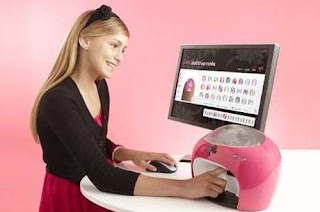
Nail Printer

It is not a joke, but just a must have device for every stylish teenager girl as it can print any picture on your nails just for several seconds. It is a 3D printer which can be used at home. All you need is to connect your computer or laptop to it and then send a picture you want to print.
iMo Photo Frame Printer

As you can understand from the name of the device it looks like a photo frame. In fact, it is an 8" photo frame that can print. iMo Foto Frame Printer can deliver 6" x 4" photos right from a memory card or from computer as it has a card reader and a USB port. This portable printer has resolution of 800x600 dpi.
Waterfall Printer

One of such printers is situated in Fukuoka, Japan. This printer-fountain can print text and even images with cool water. The outlets at the top of the fountain disperse water at special timing so that producing scrolling images.
Sanwa Newtec PrePeat RP-3100II

It is the most expensive printer of the article. Specific feature of this printer is that it doesn’t use any consumables except polyethylene plastic that can be used for up to 1000 times due to special thermal printing head. However, mass production of this printer was not launched. So if you are interested in it you should consult to the manufacturer.
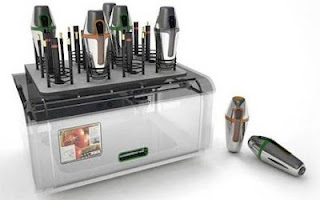
Food printer

It is a concept by Marcelo Coelho and Amit Zoran. Cornucopia Food Printer is a kind of 3D printer that is able to print with food. Special tank will store and mix ingredients and printer itself will warm them up.
Coffee Printer

This device was designed by Jeon Hwan Ju and is a unique and eco-friendly printer as it uses coffee or tea dregs as ink. All you need is to add paper and fill the ink case. This printer is incredibly saving and ecological, still it delivers only black and white documents.
Toaster printer

Let’s continue with food printing. Though it is rather a gimmick, it is worth mentioning. It can be a good present for those who like trifles. It can print both images and text. Special programme converts information into 12x12 pixel images and then burn them on toasts.
Hanging Printer

Designers Kim Jin Hee, Kim Hyung Il and Park Woo Seok worked out a concept of a portable printer that can be hanged to a desk edge. This device is intended for economising of working space due to its size. Hanging Printer is provided with build-in LCD that indicates state of the printing process. Pencil printer

Here is a concept of printer that uses pencil lead for printing. It is an eco-friendly device that saves energy as it doesn’t radiate heat and save printing paper as it can be reused: just use eraser and you are ready to print on the same piece of paper for dozens times.
Embossing Braille Printer

It is rather a social project as the concept was designed to help people who are sight-impaired. Embossing Braille Printer can deliver imprints with Braille characters transferred from voice record. The device turns to be very helpful as it can print labels for vitally important thing as pill-boxes, files, CDs etc.
Amazing new concepts and ideas! But if you still own an inkjet or laser printer and you need supplies for it, don't hesitate to visit our ink and toner web store at www.priceless-inkjet.com! Get constant 20% off replacement products and free shipping, just by creating a personal page!
Original source: 10 Most Curious Printers
Nail Printer

It is not a joke, but just a must have device for every stylish teenager girl as it can print any picture on your nails just for several seconds. It is a 3D printer which can be used at home. All you need is to connect your computer or laptop to it and then send a picture you want to print.
iMo Photo Frame Printer

As you can understand from the name of the device it looks like a photo frame. In fact, it is an 8" photo frame that can print. iMo Foto Frame Printer can deliver 6" x 4" photos right from a memory card or from computer as it has a card reader and a USB port. This portable printer has resolution of 800x600 dpi.
Waterfall Printer

One of such printers is situated in Fukuoka, Japan. This printer-fountain can print text and even images with cool water. The outlets at the top of the fountain disperse water at special timing so that producing scrolling images.
Sanwa Newtec PrePeat RP-3100II

It is the most expensive printer of the article. Specific feature of this printer is that it doesn’t use any consumables except polyethylene plastic that can be used for up to 1000 times due to special thermal printing head. However, mass production of this printer was not launched. So if you are interested in it you should consult to the manufacturer.
Food printer

It is a concept by Marcelo Coelho and Amit Zoran. Cornucopia Food Printer is a kind of 3D printer that is able to print with food. Special tank will store and mix ingredients and printer itself will warm them up.
Coffee Printer

This device was designed by Jeon Hwan Ju and is a unique and eco-friendly printer as it uses coffee or tea dregs as ink. All you need is to add paper and fill the ink case. This printer is incredibly saving and ecological, still it delivers only black and white documents.
Toaster printer

Let’s continue with food printing. Though it is rather a gimmick, it is worth mentioning. It can be a good present for those who like trifles. It can print both images and text. Special programme converts information into 12x12 pixel images and then burn them on toasts.
Hanging Printer

Designers Kim Jin Hee, Kim Hyung Il and Park Woo Seok worked out a concept of a portable printer that can be hanged to a desk edge. This device is intended for economising of working space due to its size. Hanging Printer is provided with build-in LCD that indicates state of the printing process. Pencil printer

Here is a concept of printer that uses pencil lead for printing. It is an eco-friendly device that saves energy as it doesn’t radiate heat and save printing paper as it can be reused: just use eraser and you are ready to print on the same piece of paper for dozens times.
Embossing Braille Printer

It is rather a social project as the concept was designed to help people who are sight-impaired. Embossing Braille Printer can deliver imprints with Braille characters transferred from voice record. The device turns to be very helpful as it can print labels for vitally important thing as pill-boxes, files, CDs etc.
Amazing new concepts and ideas! But if you still own an inkjet or laser printer and you need supplies for it, don't hesitate to visit our ink and toner web store at www.priceless-inkjet.com! Get constant 20% off replacement products and free shipping, just by creating a personal page!
Original source: 10 Most Curious Printers
Monday, June 18, 2012
Konica Minolta bizhub PRO C754: The right mix for the print industry
Success and a competitive edge in the print industry depend on a good mix of print products and reliable technology. In meeting these requirements the bizhub PRO C754, Konica Minolta’s new colour multifunction printer (MFP), offers a powerful feature set of innovative technologies and strong price performance.
Its unfailing print engine, powerful scanning features, ease of use and affordable price make the bizhub PRO C754 multifunction printer a safe investment for different application areas. It’s convenient operation keeps the digital learning curve low and lets printers concentrate fully on their business.
In the print-for-pay business, time is money. With its intuitive and customisable user panel, the bizhub PRO C754 multifunction printer enables print providers to save valuable time by offering walk-in users self-service for their copying, printing and scanning needs.
Mark Hinder, Production Print Market Development Manager says, “The bizhub PRO C754 is particularly suited to Central Reprographics Department (CRD) printing. It provides a great mix of productivity and economic efficiency, especially on mixed short run jobs. And its embedded Fiery controller offers a range of valuable tools.”
Efficiency is key for CRDs looking to support incoming requests with competence and creditable results. The bizhub PRO C754 multifunction printer fulfils their demands with powerful finishing features that increase productivity and allows print runs to be automatically completed without requiring any further manpower. Konica Minolta’s new multifunctional device produces customised full colour content in-house and on-demand, saving both time and money. The technical reliability of the bizhub PRO C754 keeps the system up and running and gives productivity an additional boost. Widening the CRD’s scope of duties, the bizhub PRO C754’s scanning features easily turn it into a central scanning facility, offering direct digitisation into workflows so that users are left with more time to concentrate on their real tasks.
Buy Konica Minolta printer supplies, from our web store.
Monday, May 21, 2012
New Mobile and Cloud Printing and Sharing Solutions for HP Wide-Format Printers
Hewlett-Packard / HP has introduced new mobile and cloud-based printing and sharing solutions for its Designjet wide-format printing systems, including an HP ePrint & Share application for Android.
HP is demonstrating the new solutions at the American Institute of Architects 2012 National Convention. They include:
· An HP ePrint & Share mobile application for Android smartphones and tablets, allowing these mobile users to access, view and print drawings.
· New features for HP ePrint & Share, including the ability to print PDF files directly from e-mail, and optimization for the Apple iPad.
· For Designjet Web-connected printers is HP-enabled cloud printing, now available directly from the Autodesk AutoCAD WS application.
HP ePrint & Share Enhancements
HP’s ePrint & Share is a free Web service that enables users to access and print drawings virtually anywhere using smartphones, tablets, and laptops, or from a Designjet ePrinter’s touch screen. It’s primarily designed for freelance architects, small- and mid-size architecture and engineering firms, and mid-size and large construction companies.
Brian Swanner, senior architect at Waggonner & Ball Architects explained how his firm uses ePrint & Share:
“With partners around the world, we needed a solution that would alleviate communication issues associated with working across great distances. The new features built into HP ePrint & Share helped us find ways to share designs with a variety of partners and, with the mobile application, we can print where the job takes us, speeding up the design-and-build process.”
The HP ePrint & Share mobile application, now available from Android and iOS devices, adds these enhancements:
· Print to any Designjet Web-connected printer, whether at a home office or a partner’s site. Designjet Web-connected printers include the Designjet T2300 eMFP and Designjet T1300 and T790 ePrinters.
· Print PDF files directly from e-mail by selecting the HP ePrint & Share application via the “Open in” button provided by Apple iOS devices or “Share” button provided by Android devices.
ePrint & Share is available at no cost as a download for Designjet customers. The mobile application is initially available for free through Google Play and Apple’s App Store.
HP and Autodesk Provide Mobile Printing for AutoCAD WS Users
HP and partner Autodesk are also demonstrating the new HP ePrint & Share-enabled Plot to Print cloud-printing functionality for AutoCAD WS, a Web and mobile application that enables users to view, edit and share DWG files from virtually anywhere via a Web browser or mobile device.
By registering for HP ePrint & Share, users can access and print their designs on any Designjet ePrinter directly from the AutoCAD WS application, with full control over plot styles, paper sizes, layouts and more. When printing from AutoCAD WS using ePrint & Share, a high-resolution copy of the file is saved to the user’s ePrint & Share cloud library, making it easy to retrieve, share and reprint designs.
Shop for wide format printer cartridges at www.priceless-inkjet.com
Original source: New Mobile and Cloud Printing, Sharing Solutions for HP Wide-Format Printers
HP is demonstrating the new solutions at the American Institute of Architects 2012 National Convention. They include:
· An HP ePrint & Share mobile application for Android smartphones and tablets, allowing these mobile users to access, view and print drawings.
· New features for HP ePrint & Share, including the ability to print PDF files directly from e-mail, and optimization for the Apple iPad.
· For Designjet Web-connected printers is HP-enabled cloud printing, now available directly from the Autodesk AutoCAD WS application.
HP ePrint & Share Enhancements
HP’s ePrint & Share is a free Web service that enables users to access and print drawings virtually anywhere using smartphones, tablets, and laptops, or from a Designjet ePrinter’s touch screen. It’s primarily designed for freelance architects, small- and mid-size architecture and engineering firms, and mid-size and large construction companies.
Brian Swanner, senior architect at Waggonner & Ball Architects explained how his firm uses ePrint & Share:
“With partners around the world, we needed a solution that would alleviate communication issues associated with working across great distances. The new features built into HP ePrint & Share helped us find ways to share designs with a variety of partners and, with the mobile application, we can print where the job takes us, speeding up the design-and-build process.”
The HP ePrint & Share mobile application, now available from Android and iOS devices, adds these enhancements:
· Print to any Designjet Web-connected printer, whether at a home office or a partner’s site. Designjet Web-connected printers include the Designjet T2300 eMFP and Designjet T1300 and T790 ePrinters.
· Print PDF files directly from e-mail by selecting the HP ePrint & Share application via the “Open in” button provided by Apple iOS devices or “Share” button provided by Android devices.
ePrint & Share is available at no cost as a download for Designjet customers. The mobile application is initially available for free through Google Play and Apple’s App Store.
HP and Autodesk Provide Mobile Printing for AutoCAD WS Users
HP and partner Autodesk are also demonstrating the new HP ePrint & Share-enabled Plot to Print cloud-printing functionality for AutoCAD WS, a Web and mobile application that enables users to view, edit and share DWG files from virtually anywhere via a Web browser or mobile device.
By registering for HP ePrint & Share, users can access and print their designs on any Designjet ePrinter directly from the AutoCAD WS application, with full control over plot styles, paper sizes, layouts and more. When printing from AutoCAD WS using ePrint & Share, a high-resolution copy of the file is saved to the user’s ePrint & Share cloud library, making it easy to retrieve, share and reprint designs.
Shop for wide format printer cartridges at www.priceless-inkjet.com
Original source: New Mobile and Cloud Printing, Sharing Solutions for HP Wide-Format Printers
Friday, May 18, 2012
Printing a human organs, healing wounds using printers!
Printing a human organs, healing wounds... Printers are getting better and smarter.
Amazing new technology! But if you still own an inkjet or laser printer and you need supplies for it, don't hesitate to visit our ink and toner web store at www.priceless-inkjet.com! Get 20% off replacement products and free shipping, just by creating a personal page!
Enjoy and share!
Amazing new technology! But if you still own an inkjet or laser printer and you need supplies for it, don't hesitate to visit our ink and toner web store at www.priceless-inkjet.com! Get 20% off replacement products and free shipping, just by creating a personal page!
Enjoy and share!
Monday, May 14, 2012
Free NetGear App Makes Virtually Any Printer AirPrint Compatible

With the new NetGear Genie App, however, Apple iPad, iPhone and iPod touch iOS users can wirelessly print to any printer or MFP, whether connected wirelessly to the home network, USB-connected to a PC, or connected through a USB port to a NetGear ReadyShare print-capable router. The Windows OS and Mac OS NetGear Genie App upgrade is available for download at no charge at netgear.com/genie. NetGear Genie is also available for download for Apple iPad, Apple iPhone, and Android Smartphones and tablets from the Apple store and Google Play store.
Genie sounds cool but an analysis of the feature set tells us that since a USB-connected printer can process AirPrint jobs via Genie, there is software running on the PC that directs the incoming AirPrint job to the printer. It also means that a PC needs to be running with print drivers installed in order for Genie to do its thing. Remote printing solutions such as HP ePrint and AirPrint only require that a printer is installed on a network with Internet access–a running PC and/or print drivers on either end are not required.
Keep in mind that AirPrint only functions with printers connected to a local wireless network that you have access to. The only thing that is “remote” about it is that you can print wirelessly and most mobile device users who need to print are thankful that they can even print in the first place. It seems to us that a $99 HP inkjet printer with AirPrint/ePrint compatibility is a better solution that allows you to print from any iOS application that supports share-to-e-mail, not just those that feature AirPrint capability. Plus, HP ePrint is truy a “remote” printing solution because you can send print jobs to your ePrint capable printer from anywhere and from any e-mail capable device, and you don’t need a PC running nor print drivers installed on anything. Finally, in case you don’t know: Apple, not developers determines which apps support AirPrint, so its implementation is inconsistent between apps–even Apple’s in-house apps–so the ability to print via share-to-e-mail/ePrint neatly fills in the “printing gaps in the apps.”
In summary, NetGear Genie is a free workaround for iOS users who cannot afford a $99 AirPrint/ePrint capable printer and don’t mind having a PC up and running 24/7.
Buy printer ink cartridges and toner supplies from Priceless Ink & Toner
Original source: Free NetGear App Makes Virtually Any Printer AirPrint Compatible
Thursday, May 03, 2012
Up to 1.5 million Visa, MasterCard credit card numbers stolen
Global Payments, the U.S.-based credit card processor company that experienced a security breach affecting plastic issued from Visa and MasterCard, today confirmed that the breached portion of its processing system was confined to North America. The company also finally revealed how many credit card numbers were stolen: less than 1,500,000.
News broke on Friday that Visa and MasterCard warned banks of a major potential breach at a U.S.-based credit card processor. Both Visa and MasterCard then confirmed the breach, although the two also emphasized their own security systems were not compromised. Soon after, Global Payments confirmed it had identified unauthorized access into its processing system.
Estimates previously ranged from 50,000 to 10 million credit cards, but Global Payments has reduced that to just 15 percent of the upper bound. Then again, 1.5 million credit card numbers is nothing to scoff at. Thankfully for Global Payments, analysts say the firm will be able to absorb any costs it needs to.
Previous reports suggested that full Track 1 and Track 2 data was taken, which means perpetrators got enough to counterfeit new cards. Global Payments’ investigation to date has revealed that Track 2 card data may have been stolen, but the company is still not sure. On the other hand, Global Payment was confident enough to say that cardholder names, addresses, and social security numbers were not obtained by the criminals.
Last but certainly not least, Global Payments believes that this incident is contained, based on its forensic analysis to date, network monitoring, and additional security measures which it did not detail. The company also says it “continues to work with industry third parties, regulators and law enforcement to assist in the efforts to minimize potential cardholder impact” and that it “has engaged multiple information security and forensics firms to investigate and address this issue.”
“We are making rapid progress toward bringing this issue to a close,” Global Payments Chairman and CEO Paul R. Garcia said in a statement. “Our nearly 4,000 employees around the world are focused on providing exceptional service. We are open for business and continue to process transactions for all of the card brands.”
The origin of the hack is still unknown.
Source: Up to 1.5 million Visa, MasterCard credit card numbers stolen
As on-line customers ourselves, we at Priceless Ink & Toner Company are concerned about our own privacy too and thought it would be good to send a courtesy message to our customers and assure you that any billing information shared with Priceless is safe and secure. Our company does NOT use services provided by Global Payments.
We take pride in our "Triple Secure Checkout System" which ensures all data provided to our company is kept safe and secure. It has been since 1998!
News broke on Friday that Visa and MasterCard warned banks of a major potential breach at a U.S.-based credit card processor. Both Visa and MasterCard then confirmed the breach, although the two also emphasized their own security systems were not compromised. Soon after, Global Payments confirmed it had identified unauthorized access into its processing system.
Estimates previously ranged from 50,000 to 10 million credit cards, but Global Payments has reduced that to just 15 percent of the upper bound. Then again, 1.5 million credit card numbers is nothing to scoff at. Thankfully for Global Payments, analysts say the firm will be able to absorb any costs it needs to.
Previous reports suggested that full Track 1 and Track 2 data was taken, which means perpetrators got enough to counterfeit new cards. Global Payments’ investigation to date has revealed that Track 2 card data may have been stolen, but the company is still not sure. On the other hand, Global Payment was confident enough to say that cardholder names, addresses, and social security numbers were not obtained by the criminals.
Last but certainly not least, Global Payments believes that this incident is contained, based on its forensic analysis to date, network monitoring, and additional security measures which it did not detail. The company also says it “continues to work with industry third parties, regulators and law enforcement to assist in the efforts to minimize potential cardholder impact” and that it “has engaged multiple information security and forensics firms to investigate and address this issue.”
“We are making rapid progress toward bringing this issue to a close,” Global Payments Chairman and CEO Paul R. Garcia said in a statement. “Our nearly 4,000 employees around the world are focused on providing exceptional service. We are open for business and continue to process transactions for all of the card brands.”
The origin of the hack is still unknown.
Source: Up to 1.5 million Visa, MasterCard credit card numbers stolen
As on-line customers ourselves, we at Priceless Ink & Toner Company are concerned about our own privacy too and thought it would be good to send a courtesy message to our customers and assure you that any billing information shared with Priceless is safe and secure. Our company does NOT use services provided by Global Payments.
We take pride in our "Triple Secure Checkout System" which ensures all data provided to our company is kept safe and secure. It has been since 1998!
Wednesday, May 02, 2012
HP Clarifies Details Regarding Chongqing Printer Factory

On April 18, SinoCast reported that HP was partnering with Foxconn Technology Group to build a new printer production base with a capacity of 30 million printers in Chongqing. That same day, various IDG news outlets, including PCWorld, reported that HP had signed an agreement to build a new printer factory in Chongqing. HP CEO Meg Whitman, said the PCWorld story, participated in a signing ceremony. The article said that the factory would take two to three years to build and would produce 40 million inkjet printers, 20 million laser printers, and 150 million inkjet cartridges by 2015.
Other reports, such as an April 19 article in China Daily, said that Foxconn was the party that had signed the agreement with Chongqing municipal government. The China Daily article also said the move was part of HP’s strategy of gaining share in China’s PC and printer markets and that HP’s PC market share in China has declined by 50 percent between 2009 and 2011. That article said the factory would produce 30 million printers annually.
Taiwan-based Foxconn conducts contract manufacturing for many technology companies, with the majority of its factories located in China. The company manufactures HP laptops and desktop PCs in Chongqing. Recently, Foxconn has come under scrutiny regarding labor conditions at its factories in China, including recent coverage of facilities building iPads and other products for Apple.
The news about the new manufacturing base left us with lots of questions. Some reports mentioned Foxconn, while others did not, and we wondered to what extent each party was involved in the proposed factory. Also, reports varied on what the facility will produce. If, as the PCWorld article stated, the facility would be producing laser printers, that would be particularly big news as Canon is HP’s exclusive laser manufacturing partner. So, we wondered, is Canon a partner in this endeavor? And if not, was this story even bigger news and was HP contracting with a new laser manufacturing partner?
Correcting Inaccuracies
HP, however, indicates that reports that the Chongqing factory will be producing laser printers and inkjet consumables are inaccurate. The new factory will make only entry-level inkjet printers for HP.
HP’s official statement on the new factory is as follows:
· HP’s local manufacturing supplier is planning to build a manufacturing facility in Chongqing.
· HP expects to use this facility, once completed, to manufacture entry-level HP Inkjet printers.
HP confirmed today that Foxconn is HP’s “local manufacturing supplier,” and clarified that Foxconn, not HP, signed an agreement with the Chongqing government regarding building the new facility. However, HP did sign a domestic sales contract, under which the local government agrees to support sale of HP products in China.
It does not appear that HP has plans to shift manufacturing from its current facilities for making printers or supplies to the facility in Chongqing or to consolidate all manufacturing operations in China.
HP indicates that only Foxconn can provide details on when the new Chongqing facility will be operational, and the company declined to comment on details such as the size of its or its partner’s investment, the size of the facility, or the eventual number of employees. HP did confirm that it expects to produce as many as 15 million inkjet units annually at peak periods.
Thus, while the news of HP’s new manufacturing base for entry-level inkjet printers is significant, to be sure, it does not seem that the Chongqing facility represents quite the seismic shift in HP’s printer and supplies manufacturing base as was first reported.
Visit our e-store for HP printer supplies
Original source:HP Clarifies Details Regarding Chongqing Printer Factory
Subscribe to:
Posts (Atom)
Blog Archive
About Priceless Ink & Toner Company
- Priceless Ink & Toner Company
- Since 1999 we have been a major supplier of original brand (OEM), compatible replacement and remanufactured Premium Quality inkjet cartridges, laser toner cartridges and other printer supplies. Our customers range in size and include the United States Government, small and large businesses, schools and individuals. Each of our customers is equally important to us and is treated with the same friendly professionalism. Visit us at Price Less Inkjet Cartridge Co.